
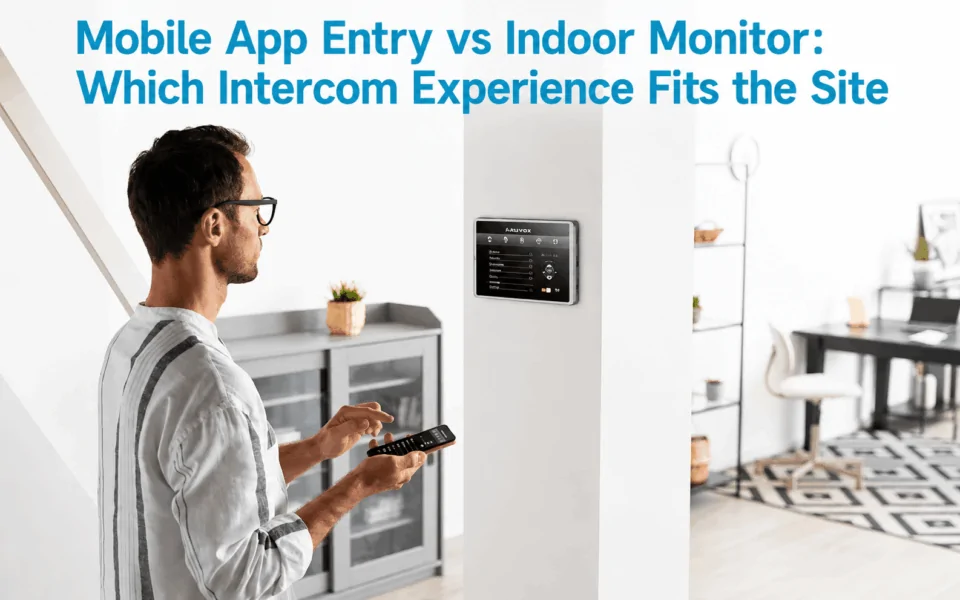
Mobile apps and indoor monitors are different answering interfaces within the same intercom workflow. The visitor still uses the entrance intercom; the main difference is whether the call goes to a smartphone, a fixed indoor station, or both. Mobile app answering offers greater flexibility. Meanwhile, indoor monitors provide a more consistent shared answering point.
Modern intercom systems have shifted far beyond hardware specifications. Today, property owners and developers are focused on how people actually interact with these systems, leading to the choice between a mobile app entry vs indoor monitor. It’s about user experience, convenience, and how access fits into everyday life.
This guide breaks down the differences between mobile app entry vs indoor monitor, helping you choose the right solution. Keep reading!
Mobile App or Indoor Monitor: What Are You Actually Choosing?
When comparing mobile app entry vs indoor monitor systems, the main decision is not how the visitor initiates the call. In most installations, the visitor still uses an entrance intercom or door station at the gate, lobby or building entrance.
The difference is where that intercom call is answered and how the authorised user responds.
A typical workflow may look like:
Entrance intercom → smartphone app
or:
Entrance intercom → fixed indoor monitor
or, on many modern systems:
Entrance intercom → smartphone app + indoor monitor
This means mobile apps and indoor monitors should be viewed as different answering interfaces within the same intercom and access-control workflow, rather than completely separate entry systems.
A smartphone app gives residents or staff the flexibility to answer calls remotely, view visitors and release an authorised door or gate from a compatible mobile device. An indoor monitor provides a dedicated, fixed answering point inside the property, usually with a larger screen and permanent connection to the intercom system.
These approaches can also coexist. Modern IP intercom platforms, including systems from 2N and Akuvox, can support both mobile answering and indoor stations within the same installation. The better choice therefore depends on how people use the property, where calls need to be answered, network availability, accessibility requirements and how much reliance the site wants to place on personal smartphones.(1 2N describes residents answering either through its mobile app or an indoor station.Date of access on 20/08/2026↓).(2 Akuvox supports smartphone visitor calls alongside indoor monitors.Date of access on 20/08/2026↓).
How Mobile App Intercom Answering Fits Different Sites
Mobile app answering changes the intercom experience by routing visitor calls directly to a resident’s or staff member’s smartphone. Instead of walking to a fixed indoor station, the authorised user can typically see the visitor, speak with them and release a connected door or gate through the app.
Best Suited to Mobile-First Properties
Mobile app intercoms are particularly well suited to modern apartments, student accommodation and properties with tech-comfortable occupants. They can also work well where residents frequently move around the site or need to answer visitors while away from home.
Pros of Mobile App Intercom
One of the biggest advantages is flexibility. Residents can receive visitor calls from almost anywhere with an internet connection, making it easier to manage deliveries, guests and unexpected visitors.
Some systems also support temporary digital credentials or guest passes. Because fewer fixed indoor devices may be required, mobile-first installations can also reduce hardware requirements and associated installation costs.
Cons of Mobile App Intercom
The main limitation is that the experience depends on both the user’s phone and the network. Reliable Wi-Fi or mobile data is important for consistent call performance, while the smartphone needs to be charged, connected and configured with the correct app permissions.
A mobile-only approach may not suit every resident. Older occupants, people who are less comfortable using apps, short-term residents or users without compatible smartphones may find the experience less intuitive.
For these sites, combining mobile answering with a fixed indoor monitor can provide a more accessible and dependable intercom experience.

How Indoor Monitor Intercom Answering Fits Different Sites
An indoor monitor provides a dedicated answering point inside the property. When a visitor presses the entrance intercom, the call appears on the fixed monitor, allowing the resident or staff member to see and speak with the visitor and, where configured, unlock the connected door or gate.
Best Suited to Homes and Mixed-User Buildings
Indoor monitors are particularly well suited to family homes, premium apartments and buildings with mixed-age residents. They are also useful where occupants may not want to rely on personal smartphones for everyday visitor access.
Pros of Indoor Monitor Intercom
A major advantage is consistency. The monitor stays in a known location and is ready for use without requiring someone to find, charge or unlock a phone first. Physical buttons or touchscreen controls can also make the system straightforward for children, older residents and users who prefer a simple fixed interface.
Because the monitor is part of the installed intercom system, users do not need to own a compatible smartphone, install an app or maintain individual login credentials. Depending on the system architecture, local indoor communication may also continue to function even if external internet services are unavailable.
Cons of Indoor Monitor Intercom
The trade-off is reduced flexibility. Indoor monitors require dedicated hardware, suitable wall space and usually network or low-voltage cabling, which can increase installation costs.
They are also fixed to one location, so users generally need to be inside the property and near the monitor to answer a visitor unless mobile answering is added as part of a hybrid system.

Mobile App vs Indoor Monitor: Key Differences
The most important differences involve where calls can be answered, how reliable the interface is, who shares access and how users are managed over time.
Where the User Can Answer
A mobile app can potentially receive intercom calls from almost anywhere, provided the phone has suitable internet connectivity. This makes it useful for residents or staff who need to respond while away from the property.
An indoor monitor is fixed within the building, so the user generally needs to be near that device to answer.
Cost
A mobile app can reduce upfront hardware costs because fewer dedicated indoor stations may be required. This can be attractive for larger apartment projects, student accommodation or sites where most occupants already use smartphones.
An indoor monitor adds the cost of the physical unit as well as cabling, mounting and installation. Where several monitors are required throughout a building, those costs can increase further.
However, total project cost should still be assessed at system level, as mobile platforms may also involve licensing, cloud services or account-management requirements depending on the manufacturer.
Speed and Convenience
A smartphone can be very convenient when the user already has it nearby. Calls can be answered without walking to another room, and remote users may still be able to manage visitors.
However, a fixed monitor can be simpler in shared environments. Reception areas, family homes or supported accommodation may benefit from having one clearly located device that does not depend on a particular person’s phone.
Reliability
A mobile app depends on several external factors, including Wi-Fi or mobile data, phone battery level, operating-system settings, app permissions and notification delivery. If any of these are unavailable or incorrectly configured, visitor calls may be delayed or missed.
An indoor monitor normally has a dedicated power supply and fixed system connection, providing a more consistent answering point inside the property. It does not rely on someone keeping a personal smartphone charged or correctly configured.
However, the monitor still depends on the underlying intercom network, power supply and system infrastructure, so good overall system design remains important.
Visitor Video Experience
Both options can provide live visitor video where supported by the intercom system.
The actual experience can depend on several factors, including:
- monitor screen size;
- smartphone app design;
- intercom camera resolution; and
- local network or internet quality.
A larger indoor monitor may provide a clearer dedicated viewing experience, while a mobile app offers greater flexibility.
Door and Gate Release
Both mobile apps and indoor monitors can potentially release configured doors, pedestrian gates or vehicle gates.
The available controls depend on the overall system design, including the intercom platform, access-control hardware and how each entrance has been programmed. The answering interface alone does not determine which entrances can be unlocked.
Read more: Intercom, Gate and Door Release Workflows for Apartment Entry
Dependency on Internet and Personal Devices
This is one of the biggest practical differences.
Mobile app performance depends on the user’s smartphone, battery level, operating system, app permissions and internet connection. A poor mobile signal or disabled notification can affect how quickly a call is received.
An indoor monitor normally has dedicated power and a fixed system connection, making it less dependent on individual user devices. However, its performance still depends on the underlying intercom network and system architecture.

Shared vs Individual Use
An indoor monitor is typically a shared property device. Multiple residents, family members or staff can use the same answering station without needing separate accounts.
A mobile app is generally associated with an individual user account and personal device. This can provide personalised access, but it also means each authorised person may need to be enrolled and managed separately.
This difference becomes particularly important in offices, rental properties, shared accommodation and supported housing.
Administration and User Changes
User management should also be considered when comparing the two experiences.
For rental apartments, offices and other properties with changing occupants, administrators may need to manage:
- resident or staff turnover;
- account onboarding and offboarding;
- lost or replaced smartphones;
- changed phone numbers or devices; and
- removal of access when someone leaves.
Indoor monitors can reduce some of this individual account administration because the device remains with the property. Mobile systems can make user changes flexible, but only when the platform provides straightforward account and credential management.
A Summary Comparison Table
| Decision Factor | Mobile App | Indoor Monitor |
|---|---|---|
| Where users can answer | Potentially anywhere with suitable internet connectivity | Fixed location inside the property |
| Cost | Can reduce hardware and installation costs where fewer monitors are required | Higher upfront cost for monitors, cabling and installation |
| Convenience | Useful for remote answering and users who already carry smartphones | Simple, dedicated interface that is always in the same location |
| Reliability | Depends on phone battery, app settings, Wi-Fi or mobile data | Dedicated power and fixed connection generally provide more consistent operation |
| Visitor video | Convenient mobile viewing, but experience depends on phone, app and network quality | Larger dedicated screen can provide a clearer fixed viewing experience |
| Door and gate release | Can release configured entrances where supported | Can release configured entrances where supported |
| Internet/device dependency | Higher dependency on personal devices and connectivity | Lower dependency on personal smartphones and external internet services |
| Shared use | Usually linked to individual accounts and devices | Well suited to shared use by residents, families or staff |
| User changes | Requires account onboarding, offboarding and management of replaced or lost phones | Device stays with the property, reducing individual device management |
| Best suited to | Mobile-first apartments, student housing and users needing remote access | Family homes, shared environments, mixed-age residents and fixed reception points |
Which Intercom Experience Fits Different Sites?
The best intercom experience depends on how the property is used, who needs to answer visitors and whether remote access is important. Rather than assuming a mobile app or indoor monitor is always better, the interface should match the site’s occupants, staffing model, existing infrastructure and accessibility requirements.

Villas and Houses
For villas and detached homes, a mobile app with an optional indoor monitor is often a practical combination.
Mobile answering gives residents flexibility to respond from different rooms or while away from home, which can be useful for deliveries, tradespeople and unexpected visitors. A fixed monitor can still provide a convenient shared answering point for children, older family members or anyone who does not regularly use the app.
This makes a hybrid setup attractive where both convenience and a permanent in-home interface are valued.
Apartments and Strata Buildings
Apartment projects require a broader assessment because the right interface can vary significantly between buildings.
Important considerations in these projects include:
- resident expectations;
- building management model;
- existing cabling;
- number of apartments;
- app onboarding and technical support;
- resident turnover; and
- retrofit requirements.
Some buildings may favour indoor monitors because they provide a consistent interface in every apartment. Others may prefer mobile answering to reduce dedicated hardware and provide greater flexibility.
Modern intercom platforms such as 2N support both indoor stations and mobile answering, reinforcing that neither approach is universally better for apartment environments.(3 2N support both indoor stations and mobile answering, reinforcing that neither approach is universally better for apartment environments.Date of access on 20/08/2026↓).
Read more: Retrofit Entry Communication in Older Apartment Blocks With Limited Cabling
Small Offices
A fixed indoor monitor at reception can work well where the reception desk is consistently staffed. It gives employees a clear, shared location for answering visitor calls and controlling entry.
Mobile answering becomes more useful when:
- reception is periodically unattended;
- staff regularly move around the premises;
- several employees may need to respond to visitors; or
- after-hours calls need to be handled remotely.
For small offices with changing staffing patterns, combining both interfaces can help avoid missed visitor calls.
Read more: App-Based Visitor Management: How Modern Intercoms Streamline Commercial Deliveries
Commercial and Mixed-Use Buildings
Larger commercial or mixed-use properties may benefit from providing different answering interfaces to different users. For example:
Reception → indoor monitor
Manager or security personnel → mobile app
Reception staff can use a dedicated monitor for routine visitor management, while authorised managers or security personnel retain the ability to respond remotely.
This type of arrangement highlights why many commercial projects use a hybrid intercom approach rather than selecting only one interface for the entire site.
SDA and Accessible Housing
For SDA and accessible housing, the decision should not be reduced to asking whether a particular mobile app or indoor monitor is simply “NDIS compliant”.
The more important question is:
Which interface best suits the participant’s individual communication and access needs?
For applicable High Physical Support dwellings, the SDA Design Standard requires a video, intercom or other communication system that enables communication between a participant and supports when they are not within line of sight. The requirement is intentionally technology-neutral, allowing the communication method to suit the participant and evolve as technology changes.
For one participant, an accessible indoor monitor with suitable positioning and controls may be the most practical option. For another, smartphone or tablet-based answering may provide greater independence. In some projects, both interfaces may be appropriate.
The final system should therefore consider the participant’s mobility, vision, hearing, dexterity, preferred device, support arrangements and how doors or gates need to be released as part of the broader access workflow.
The Hybrid Approach: Why Many Sites Are Combining Both
Rather than choosing one over the other, many modern developments are adopting a hybrid approach that combines mobile app entry with indoor monitors. This strategy addresses the limitations of each system while enhancing overall usability.
Indoor monitors provide a reliable, in-unit access point that doesn’t depend on mobile devices. At the same time, mobile app entry extends that functionality beyond the home, enabling remote access and real-time notifications.
This combination significantly improves the overall apartment intercom user experience. Residents can choose how they interact with the system based on their preferences and situation – whether they’re at home or on the go.
Systems from Akuvox are designed to support this seamless integration, allowing both interfaces to work together within a single ecosystem. From a future-proofing perspective, hybrid systems also offer greater scalability. As user expectations evolve, properties can adapt without replacing their entire infrastructure.(4 From a future-proofing perspective, hybrid systems also offer greater scalability.Date of access on 20/08/2026↓).
At Digital Home Systems (DHS), we help assess the site, user requirements, existing cabling and access-control workflow before recommending whether a mobile-first, monitor-based or hybrid intercom configuration is the better fit. DHS can also assist with system design, product selection, integration, commissioning and technical support.
In the ongoing discussion of mobile app entry vs indoor monitor, the hybrid model often provides the most adaptable experience by combining a reliable fixed interface with the convenience of remote mobile access.
In the ongoing discussion of mobile app entry vs indoor monitor, the hybrid model is increasingly becoming the preferred solution for forward-thinking developments.

To Sum Up,
There’s no one-size-fits-all answer when it comes to mobile app entry vs indoor monitor. Each option brings distinct advantages, and the right choice depends on your property’s specific needs.
Mobile app entry offers unmatched flexibility and mobility, making it ideal for modern, connected environments. Indoor monitors provide reliability and simplicity, ensuring consistent access regardless of external factors. Meanwhile, hybrid systems combine the best of both worlds, delivering a balanced and future-ready solution.
When making your decision between mobile app entry vs indoor monitor, consider user demographics, building type, and integration requirements. A well-chosen intercom experience doesn’t just improve security – it enhances everyday living.
At Digital Home Systems, we work with installers, developers, and integrators to design reliable, scalable automatic door entry solutions for residential, commercial, and SDA environments. Whether you’re planning a new build or upgrading an existing property, our team can help you select the right combination of mobile access, indoor monitors, and integrated control systems.
We support a wide range of technologies, including Z-Wave, KNX, and IP-based intercom systems, ensuring seamless integration with broader smart home and building automation platforms.



Comments are closed.