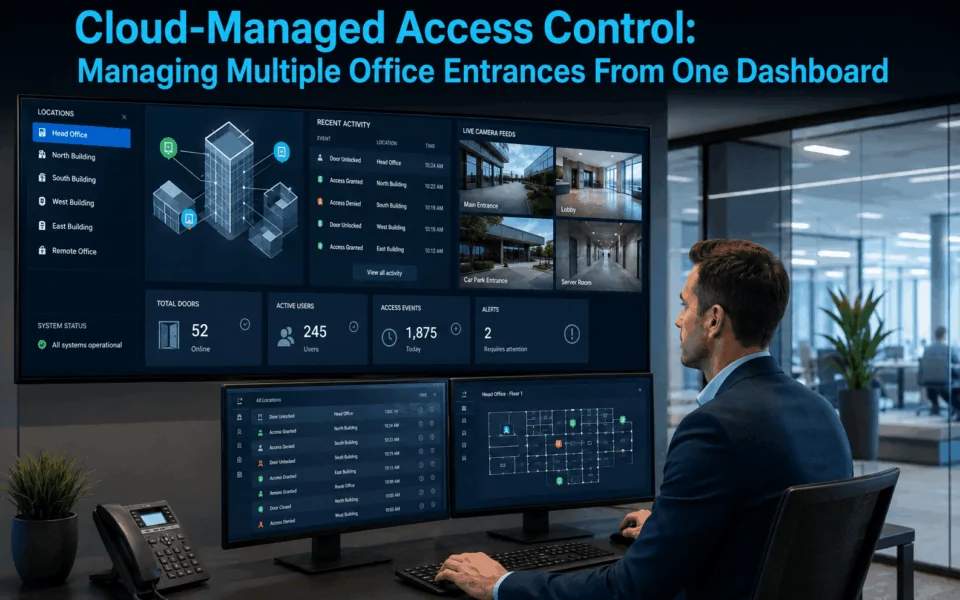
Cloud-managed access control gives office managers one central dashboard for managing multiple doors, users and even different sites. It simplifies permission changes, mobile credentials, visitor access, schedules and alerts. A reliable platform should also be assessed for cybersecurity, offline operation, scalability, licensing costs and compatibility with existing hardware before deployment.
Modern offices are becoming increasingly complex, with office managers often responsible for securing multiple entrances. Traditional access control systems can struggle to keep pace with these demands, especially when administration requires separate software platforms or manual updates. This is where cloud access control for office environments is transforming workplace operations.
Why Traditional Access Management Creates Operational Bottlenecks
Traditional access control can become increasingly difficult to manage as an organisation adds more staff, entrances or office locations. The issue is often not the basic ability to lock and unlock doors, but the amount of manual administration required to keep access permissions accurate and up to date.
Common operational problems include:
- Manually issuing and cancelling access cards: New employees may need cards programmed individually, while departing staff must have their credentials removed promptly. This becomes time-consuming in larger teams or workplaces with frequent staff changes.
- Visiting individual doors or sites to make changes: Some legacy systems require an administrator or technician to be physically present at a controller, door or office location to update access settings. Managing several entrances across multiple sites can quickly become inefficient.
- Inconsistent access permissions: When different doors or offices are managed separately, employees may end up with incorrect or outdated permissions. It can also be difficult to ensure access policies are applied consistently across the organisation.
- Lost or unreturned credentials: Physical cards, fobs and keys can be misplaced or remain with former employees. If they are not cancelled quickly, they may create an unnecessary security risk and additional replacement costs.
- Limited visibility across multiple entrances: Office managers may have to check different systems or controllers to understand who has entered a building, whether a door has been left open, or whether an unusual access event has occurred.
These practical limitations can create unnecessary administration for office managers, facilities teams and IT staff.
What Is Cloud Access Control and How Does It Work?
Cloud access control for office environments combines physical access control hardware with a cloud-hosted management platform. The cloud changes how the system is administered, but the actual access decision still depends on physical components installed at each controlled entrance.
A Typical System
A typical system of cloud access control for office include:
Credential → Reader → Door Controller/Lock → Network & Cloud Platform → Administrator Dashboard
When an employee presents a card, mobile credential or other authorised credential, the reader sends that information to the access control system. The controller then determines whether access should be granted based on the configured permissions and operates the connected electric lock or door hardware accordingly.
The cloud platform provides the management layer. Authorised administrators can use a web browser or mobile application to add users, assign permissions, review access events and manage multiple entrances from one central dashboard. Changes made in the platform can then be synchronised with the relevant controllers across the organisation.
This means cloud access control for office applications can reduce the need to manage separate local systems at individual doors or sites while still relying on properly designed readers, controllers, credentials and locking hardware at each entrance.
Cloud-Managed vs Traditional On-Premises Access Control
The main difference is where the management infrastructure is hosted.
- On-premises access control: Management software and databases are typically hosted on a local server or computer within the organisation.
- Cloud-managed access control: Administration and related data services are accessed through a hosted cloud platform, allowing authorised users to manage the system remotely.
Neither architecture is automatically the right choice for every project. Factors such as the number of sites, network infrastructure, integration requirements, IT policies and operational needs should all be considered when selecting an access control system.
Read more: Cloud-Based Vs Local Access Control: Pros, Cons & Security Differences

Operational Benefits of Managing Entrances From One Dashboard for Office Managers
For office managers, cloud access control for office environments can simplify everyday access management by bringing routine tasks into one central platform.
- Remote access: Authorised staff can unlock doors for guests, deliveries or contractors from a phone or browser. This is especially useful when reception staff are away from the entrance.
- Real-time logs: Office managers can see access activity as it happens and review who entered or exited specific doors. This provides better visibility across multiple entrances without checking separate systems.
- Easy staff updates: New employees can be added, permissions changed, and former staff access removed from one dashboard. Updates can be applied quickly across relevant doors and locations.
- Centralised multi-door management: Multiple entrances, floors or office sites can be managed through the same interface. This reduces duplicated administration and makes access permissions easier to keep consistent.
- Reduced local server requirements: Many cloud-managed systems reduce the need for a dedicated on-premises management server. This can simplify system administration, although the exact infrastructure still depends on the access control platform and project design.
Important Features of Cloud-Managed Access Control
Beyond centralised administration, a cloud access control for office system can provide practical features that improve how employees, visitors and office managers interact with multiple entrances throughout the day.
Mobile Keys
Mobile credentials allow staff to use a compatible smartphone as a digital access credential instead of relying only on a physical card or fob. Depending on the platform, credentials can be issued, updated or revoked remotely, which can make onboarding and offboarding faster. Mobile access can also reduce the administrative burden associated with replacing lost cards.
Auto-Lock Rules
Automatic locking schedules allow administrators to define when selected doors should lock or unlock. For example, a main reception entrance may unlock during normal business hours and automatically secure itself after closing, while staff-only areas remain restricted at all times. Schedules can also be adjusted for public holidays, special events or changes in office operating hours.
Visitor Passes
Temporary visitor credentials can be created for guests, contractors, cleaners or service providers without issuing permanent access cards. Access can be limited to specific doors, dates and times, helping office managers control exactly where and when a visitor can enter. Once the authorised period ends, the credential can expire automatically.
System Alerts
Cloud-managed systems can generate alerts when specific events occur, such as a forced door, a door being held open too long, controller communication issues or other configured faults. These notifications can help office managers identify problems sooner and investigate events without waiting for someone to report them manually. Alert settings can usually be configured according to the importance of each entrance or event type.

Managing Multiple Office Entrances From One Dashboard
One of the main advantages of cloud access control for office environments is the ability to manage multiple entrances from a single interface. Instead of treating each door, floor or location as a separate system, authorised administrators can manage permissions, schedules and activity across the organisation from one dashboard.
View and Manage Every Door From One Interface
A central dashboard can bring different access points into one place, making it easier to manage entrances with different security requirements.
This may include:
- reception entry;
- staff entry;
- warehouse doors;
- server rooms;
- executive areas;
- lift-floor access; and
- entrances across different office locations.
Cloud platforms can provide remote administration from internet-connected devices; ASSA ABLOY’s current Incedo Cloud, for example, promotes remote management and real-time control without requiring an administrator to be physically onsite.(1 ASSA ABLOY’s current Incedo Cloud.Date of access on 24/08/2026↓).
Add, Change or Revoke Access in Real Time
Cloud-managed systems can make day-to-day permission changes much faster. Authorised administrators can update a person’s access from the dashboard and apply those changes to the relevant doors.
For example:
- New employee: grant access to the office and required staff areas.
- Staff departure: revoke access across relevant locations.
- Contractor: provide permission for selected doors during an approved time period.
- Department change: update which rooms, floors or entrances an employee can access.
This makes it easier to keep permissions aligned with each person’s current role and responsibilities.
Set Door Schedules and Access Rules
Different entrances often need different operating rules. Cloud platforms can allow administrators to create schedules and access policies for individual doors, groups of doors or user groups.
For example, reception may remain unlocked from 8:30 am to 5:30 pm, while a staff entrance requires credentials outside business hours. Cleaners may receive access only on Tuesday and Thursday evenings, while a server room may remain restricted to authorised IT staff at all times.
These rules help automate routine access decisions and reduce the need for staff to manually lock, unlock or reconfigure doors every day.
Remotely Lock or Unlock Selected Entrances
Authorised users may also be able to remotely lock or unlock selected doors through the management platform. This can be useful when allowing an expected visitor into reception, responding to an operational issue or securing a particular area.
Remote control should still be managed carefully. Permissions should be limited to appropriate administrator roles, and system activity should be logged so there is a clear record of who performed each action and when.
Monitor Door Events and Access Logs
A central dashboard can also provide visibility into events occurring across different entrances. Depending on the system, office managers may be able to review:
- granted access;
- denied credentials;
- doors forced open;
- doors held open too long;
- credential activity; and
- administrator changes.
Having these records in one place can make it easier to investigate incidents, review unusual activity and maintain a clearer audit trail across the office.
Manage Multiple Offices or Sites
Cloud-managed access control can be particularly useful for organisations operating more than one location. A single platform may be used to manage an office and warehouse, several Melbourne offices, multiple tenancies or interstate branches.
Administrators can apply consistent access policies while still setting different permissions, schedules and rules for each site. This reduces duplicated administration and gives management a clearer view of access across the wider organisation.
Read more: How Access Control Systems Improve Workplace Security Management

Integrating Cloud Access Control With Office Systems
A cloud access control for office system can work alongside other building and workplace technologies to create smoother access and security workflows. The available integrations vary between platforms, so compatibility should be confirmed during system design.
- Video intercom and reception: A visitor can call from the entrance, reception can verify their identity, and an authorised staff member can unlock the selected door. This can improve visitor handling at offices with controlled or unattended entrances.
- CCTV: Where supported, access events can be linked with video workflows. For example, office managers may be able to review footage associated with a denied credential, forced door or other access event.
- Lift access: In multi-storey offices, access permissions can potentially extend to specific lift floors. Employees, contractors and visitors can then be restricted to the areas they are authorised to access.
- HR or identity management systems: Depending on the platform, APIs can connect access control with other enterprise software. The Security Industry Association specifically identifies cloud access control APIs as a mechanism for connecting access-control platforms with additional systems.(2 Cloud Access Control and the Importance of API Integrations.Date of access on 24/08/2026↓).
- Visitor management: Temporary credentials can be issued to approved visitors or contractors for selected doors, dates and times. This can reduce reliance on permanent cards and simplify short-term access.
- Alarm and security systems: Access control may also integrate with alarm or security platforms to support coordinated workflows, such as responding to door alarms or changing security states when authorised users enter.
The key consideration is to check API, hardware and third-party integration support before choosing the platform. Not every cloud access control system is compatible with every intercom, CCTV, lift, visitor management, HR or alarm solution.
For example, DHS has worked on projects where intercom stations, indoor monitors, PoE network equipment and controlled entrances needed to operate as one coordinated system. In these situations, our team checks device compatibility, available inputs and outputs, network requirements and the intended user workflow before finalising the equipment. This helps avoid a common problem where individual products work correctly on their own but cannot deliver the required integration once installed.
Read more: Managing User Permissions In Large Access Control Deployments

Cybersecurity and Business Continuity for Cloud Access Control
A cloud access control for office system is both physical security infrastructure and connected building technology. Cybersecurity therefore needs to cover the cloud platform, administrator accounts, network connections and the hardware installed at each entrance.
- Administrator account security: Protect administrator accounts with features such as multi-factor authentication, strong login controls and least-privilege access. Only authorised staff should be able to change users, credentials, schedules or system settings.
- Encryption and data protection: Avoid assuming that data is automatically secure simply because it is stored or managed in the cloud. Protection depends on the platform’s encryption, hosting architecture, account controls, patching and wider security practices.
- Role-based administrator permissions: Different users should have access only to the functions they need. For example, an office manager may manage staff and visitors, a security manager may have system-wide control, while an installer may only access technical configuration.
- Audit logs: The system should provide a clear record of important administrative changes. This can include who modified a user’s permissions, changed a door schedule, added an administrator or issued and revoked credentials.
- Software and firmware updates: Cloud management does not remove the need to maintain readers, controllers, gateways and other edge hardware. Firmware updates and security patches should remain part of ongoing system maintenance.
- Business continuity during outages: Organisations should confirm how the system behaves if internet connectivity, power or cloud services become unavailable. Many systems can continue making local access decisions using stored permissions, while remote management and live reporting may be temporarily unavailable.
When comparing platforms, review both cybersecurity controls and outage behaviour, rather than focusing only on convenience features. A suitable system should support secure administration while maintaining appropriate access operation during common network or service disruptions.
Read more: Offline Access Control: How Systems Work During Network Outages
How to Evaluate a Cloud Access Control Platform for Your Office
Choosing a cloud access control for office environment should involve more than comparing software features. The right platform needs to suit the number of doors, existing hardware, security requirements, integrations and long-term operating costs of the site.
Number of Doors and Sites
Consider both current requirements and future growth. A system that works well for four doors today should ideally be able to expand to 20 doors, additional floors or multiple office locations without requiring a complete platform change.
Credential Options
Check which credential types the platform supports, such as cards, fobs, PINs and mobile credentials. Some projects may also consider biometric access where appropriate, subject to privacy, security and operational requirements.
Offline Capability
Confirm what happens when internet connectivity is lost. Important questions include whether local controllers can continue validating existing credentials and which functions, such as remote administration or live reporting, become unavailable during an outage.
Integration Support and APIs
Review compatibility with systems such as video intercoms, CCTV, visitor management, lifts, alarms and identity platforms. API support is particularly important if the organisation expects access control to connect with other workplace software.
Administrator Roles and Audit Logs
Look for flexible administrator permissions so different staff can be given only the level of control they require. The platform should also provide audit logs showing important actions such as permission changes, credential updates and door schedule modifications.
Cybersecurity Features
Evaluate features such as multi-factor authentication, encryption, secure account controls, software updates and access monitoring. Cybersecurity should be assessed across both the cloud platform and the controllers or other connected hardware installed onsite.
Reporting
Consider how easily office managers can review access activity across multiple entrances. Useful reporting may include granted and denied access, door events, credential activity, administrator changes and site-specific reports.
Licensing and Ongoing Costs
Cloud access control commonly includes recurring software or service fees. Compare the initial hardware and installation cost together with ongoing licensing, subscriptions, support and upgrade costs, rather than judging systems by hardware price alone.
Existing Door Hardware Compatibility
For retrofit projects, determine whether the new platform can reuse existing components such as electric strikes, magnetic locks, readers, cabling and door contacts. Reusing suitable hardware can reduce installation work, but compatibility and condition need to be assessed first.
Digital Home Systems (DHS) can assess the existing doors, locking hardware, cabling, controllers and network infrastructure before recommending a cloud access control platform. This helps determine what can be retained, what should be upgraded and how the system can be designed for future expansion.

In Conclusion
As offices become more complex, cloud access control for office environments can make it easier to manage users, doors and multiple locations from one central platform. With the right system, office managers can update permissions faster, improve visibility across entrances and reduce the manual work involved in day-to-day access administration.
The best results come from choosing a platform that matches the site’s existing hardware, security requirements, integration needs and future growth plans.
If you’re planning to upgrade or replace an existing access control system and figure out the best security solutions, Digital Home Systems (DHS) can help assess your doors, locking hardware, cabling, network infrastructure and management requirements. Explore our access control solutions or contact us to discuss a practical cloud-managed access control solution for your office or commercial facility.
FAQs
Cloud access control for office buildings is a system that allows administrators to manage doors, users, and access permissions through a secure online platform rather than relying on local servers or on-site software.
Yes. Most cloud-based platforms are designed to support multiple buildings, floors, and sites through a single management dashboard, providing centralised control and reporting.
In most cases, yes. Access controllers typically continue operating locally using stored credentials. Once internet connectivity is restored, data synchronisation resumes automatically.
Modern cloud access control platforms use encryption, secure authentication, audit logging, user permission controls, and redundancy measures to help protect access data and maintain system security.
Yes. Many cloud access control solutions support mobile credentials, allowing employees to use smartphones as digital access keys instead of traditional cards or fobs.