Smart home technology has transformed how people secure their homes and businesses. Among the most popular innovations is the Smart Lock, which allows users to control door access through smartphones, keypads, biometrics, or voice commands. These advanced systems offer convenience, enhanced security, and seamless integration with smart home ecosystems.
However, like any electronic device, a Smart Door Lock can occasionally experience technical issues or unexpected failures. Power outages, connectivity problems, or mechanical faults may temporarily prevent normal operation. Understanding potential failure scenarios and knowing how emergency override options work is essential for maintaining reliable access control.
This comprehensive guide explores common Smart Lock failure scenarios, the causes behind them, and the emergency solutions that ensure you never get locked out.
- True Hands-Free Entry: UWB (Ultra-Wideband) technology enables the door to recognize your approach and unlock automatically, while its precise positioning helps reduce unintended activation from inside the property.
- Universal Compatibility: With support for Matter and Aliro standards, a single lock can connect across Apple, Google and Alexa ecosystems, while digital keys are designed to work across different smartphone platforms.
- Next-Gen Biometrics: Advanced 3D Face Recognition and Palm/Vein scanning provide faster and more sophisticated biometric authentication than conventional fingerprint readers.
- No More Battery Swaps: Some emerging models are exploring wireless optical charging (power over air) and integrated solar panels to extend operating time and reduce the need for frequent battery replacement.
- AI Security: Built-in AI can identify unusual access behaviours, such as tailgating, and flag entry patterns that differ from normal activity for additional security monitoring.
- Thread Connectivity: Thread provides a low-power alternative to Wi-Fi for compatible smart-home devices, helping support responsive connectivity while potentially extending battery life.
How Do Smart Locks Work?
Before discussing failure scenarios, it is important to understand how a Smart Door Lock operates. Unlike traditional locks that rely solely on mechanical keys, smart door locks combine mechanical components with digital technology.

Most smart door locks include several core elements:
- A motorized locking mechanism
- Wireless communication modules (Wi-Fi, Bluetooth, or Zigbee)
- Authentication methods such as PIN codes or biometrics
- Mobile apps or cloud platforms for remote access
- Backup entry options such as keys or emergency power ports
These components work together to control access to a property. When a user enters a PIN code, scans a fingerprint, or unlocks the door through an app, the system verifies authentication and activates the locking motor.
Smart locks can also form part of a broader access control system, particularly where multiple users, entry points or security technologies need to be managed together.
While these systems are highly reliable, they depend on power, connectivity, and software stability, which means failures can occasionally occur.
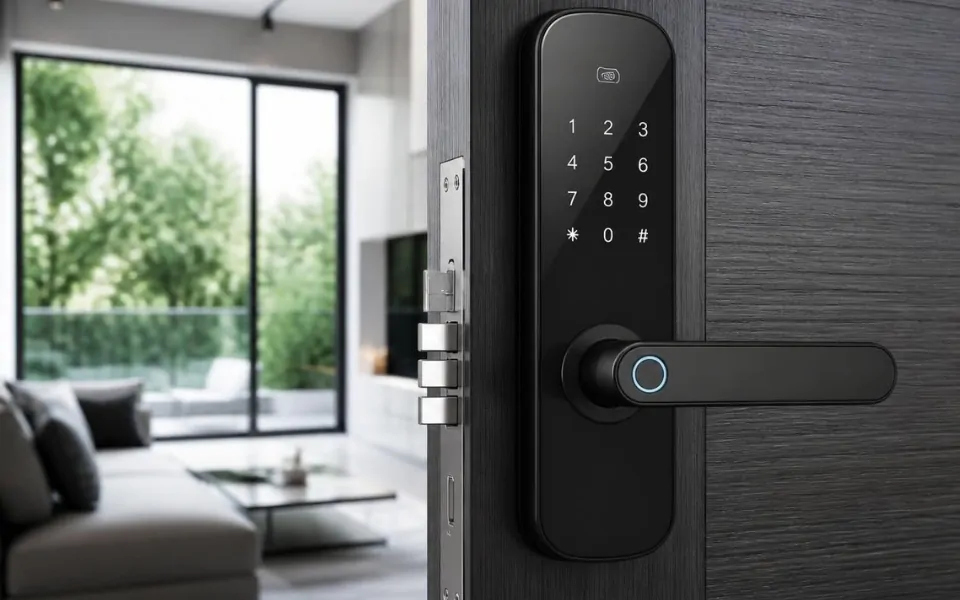
Smart lock installed on modern residential door with digital access control.
Comparison Table: Smart Lock Failure Scenarios and Emergency Solutions
| Failure Scenario | What Happens | Possible Cause | Recommended Emergency Solution | Prevention / Best Practice |
|---|---|---|---|---|
| Battery Depletion | The lock may stop responding to electronic commands | Batteries are low or completely depleted | Use an emergency battery port, external power source or mechanical key where available | Replace batteries regularly and monitor low-battery alerts |
| Wi-Fi / Connectivity Failure | Remote unlocking, live logs and smart-home integrations may stop temporarily | Wi-Fi outage, Bluetooth issue or network disruption | Use PIN, fingerprint or other local access methods | Maintain a reliable network and keep hubs properly configured |
| Mobile App Failure | Remote control and access management may become unavailable | Outdated app, OS compatibility issue or cloud-service outage | Use keypad, biometric or physical backup access | Keep the app and mobile operating system updated |
| Firmware / Software Issue | Some smart lock functions may become unreliable or unavailable | Software bugs or outdated firmware | Use an available alternative access method and update the system when service is restored | Keep firmware updated and follow manufacturer recommendations |
| Mechanical Lock Jam | The deadbolt may fail to lock or unlock correctly | Door misalignment, debris, wear or installation problems | Use the mechanical key override where provided and inspect the door alignment | Maintain the locking mechanism and ensure correct installation |
| Motor Failure | The lock may not physically engage or release the deadbolt | Motor or internal mechanical component failure | Use a mechanical override if available and arrange professional inspection | Perform regular maintenance and monitor unusual motor behaviour |
| Biometric Recognition Failure | Fingerprint or facial authentication may not recognise the authorised user | Dirty sensor, wet finger, lighting conditions or calibration issue | Use a PIN code, mobile app or physical key as an alternative | Keep sensors clean and maintain multiple access methods |
| Environmental Conditions | Sensors or electronic components may behave unpredictably | Extreme temperature, humidity or dust | Use an alternative access method and inspect the lock once conditions return to normal | Choose suitable hardware and protect the installation environment |
| Emergency Access Required | Property managers or authorised staff may need access during a system failure | Tenant lockout, maintenance requirement or emergency situation | Use master codes, backup keys or emergency credentials where supported | Establish a documented emergency access procedure |
Common Causes of Smart Lock Failures
A Smart Door Lock may fail for several reasons, ranging from minor issues to more complex system problems.
Power Supply Issues
Most smart door locks operate on batteries. If the batteries run out unexpectedly, the lock may stop responding to digital commands.
Connectivity Problems
Many smart door locks rely on Wi-Fi or Bluetooth connections to communicate with mobile apps and home automation systems. Network disruptions can affect remote access.
Software or Firmware Bugs
Like any digital device, smart door locks rely on software to function. Firmware bugs or outdated software may cause temporary malfunctions.
Mechanical Wear
The internal locking mechanism still contains physical components that can experience wear over time.
Environmental Factors
Extreme temperatures, humidity, or dust may interfere with sensors and electronics.
Understanding these causes helps homeowners and property managers prepare for potential Smart Door Lock issues.
Smart Lock Battery Failure Scenario
One of the most common problems with a Smart Lock is battery depletion. Since most smart door locks rely on battery power, failure to replace batteries on time can lead to unexpected lockouts.
Fortunately, manufacturers design smart door locks with warnings and backup solutions.
Low Battery Alerts
Many smart door locks send notifications through mobile apps when battery levels are low. Some models also include audible alerts or LED indicators.
Emergency Battery Ports
Some smart door locks include external battery terminals that allow users to temporarily power the device using a 9V battery.
Mechanical Key Backup
Many systems include a hidden key cylinder that allows manual unlocking when batteries fail.
By monitoring battery levels regularly, users can prevent most battery-related Smart Lock failures.
Modern smart lock system providing secure keyless entry for smart home.
Many electronic locks provide a physical key or emergency power option as a backup when the primary electronic system is unavailable. 1Schlage — Smart Locks: Battery Backup and Security Features. Date of access on 01/09/2026↓
Connectivity Failure and Network Issues
Connectivity is a critical component of a Smart Lock, especially when users rely on remote access through mobile apps.
When Wi-Fi or Bluetooth connectivity fails, several issues may occur:
- Remote unlocking may not work
- Access logs may not update in real time
- Integration with smart home systems may stop temporarily
However, in most cases, local authentication methods such as PIN codes or fingerprint scanners continue working even when the internet connection is lost.
To minimize connectivity issues, it is recommended to maintain a strong wireless network and keep smart home hubs properly configured.
Where smart locks are part of a larger connected property, they may also work alongside smart security solutions such as CCTV, intercoms and access control.

Mobile App or Software Malfunctions
Smart locks depend on mobile apps to manage access permissions, monitor activity, and control the device remotely. If the app experiences technical issues, users may lose certain features.
Possible causes include:
- Outdated app versions
- Operating system compatibility issues
- Cloud service interruptions
- Server outages
Even when app functionality is limited, most Smart Lock systems continue to allow entry using keypad codes or biometric authentication.
Keeping apps updated ensures smooth performance and minimizes software-related problems.
Smart lock technology controlling door access through mobile automation.
Mechanical Lock Jam or Motor Failure
Although a Smart Lock is primarily electronic, it still includes mechanical parts such as gears, deadbolts, and motors.
Mechanical issues can occur if:
- The door is misaligned
- The lock mechanism experiences wear
- Debris obstructs the locking components
- Improper installation affects operation
When the motor cannot fully engage the deadbolt, the lock may fail to open or close properly.
Regular maintenance and professional installation can help prevent mechanical issues.

Smart Lock Sensor and Biometric Errors
Some smart locks use fingerprint sensors or facial recognition systems for authentication. While these technologies provide convenience, they may occasionally fail to recognize users.
Common causes include:
- Dirty or wet fingerprint sensors
- Changes in fingerprint patterns
- Poor lighting conditions for facial recognition
- Sensor calibration errors
Most Smart Lock systems provide alternative access methods such as PIN codes or mobile apps to ensure reliable entry.
Smartphone app unlocking smart door lock on modern home entrance door.
Emergency Override Options in Smart Locks
Manufacturers design smart locks with multiple emergency override options to ensure users can still access their property during failures.
These features are critical for maintaining reliability and preventing lockouts.

Mechanical Key Override
Many smart locks include a traditional key cylinder hidden behind a cover. If electronic features fail, users can unlock the door with a physical key.
External Battery Power
Emergency battery ports allow users to temporarily power the lock from outside the door.
Backup PIN Codes
Some smart locks allow users to create emergency access codes that remain functional even during connectivity issues.
Manual Deadbolt Operation
In some cases, users can manually rotate the deadbolt from inside the property to unlock the door.
These redundancy features ensure that Smart Lock systems remain dependable even in unexpected situations.
Smart Lock Emergency Access for Property Managers
Property managers and businesses using Smart Lock systems must consider emergency access solutions for staff, tenants, and maintenance personnel.
Common strategies include:
- Master access codes for administrators
- Backup key storage systems
- Remote unlock capabilities through management software
- Emergency override credentials for security teams
These measures help ensure that authorized personnel can access properties when needed.
Remote access system controlling smart door lock through mobile application.
Best Practices to Prevent Smart Lock Failures
Preventive maintenance can significantly reduce the likelihood of Smart Lock malfunctions.

Replace Batteries Regularly
Even if the battery indicator shows sufficient power, replacing batteries periodically helps avoid unexpected failures.
Keep Software Updated
Firmware updates improve security, performance, and reliability.
Maintain Door Alignment
Properly aligned doors reduce strain on the lock motor.
Clean Sensors and Keypads
Dust or debris can affect biometric sensors and keypad functionality.
Monitor System Alerts
Smart locks often send notifications about system status or potential issues.
By following these practices, users can maintain reliable Smart Lock operation.
Smart Lock Security During Emergency Overrides
Emergency override features must balance convenience with security. If poorly implemented, override mechanisms could introduce vulnerabilities.
Manufacturers typically address this concern by:
- Concealing key cylinders
- Encrypting communication between devices
- Limiting the number of emergency codes
- Logging override events for monitoring
These safeguards ensure that Smart Lock systems remain secure even when emergency access methods are used.
Smart door lock connected to smartphone for wireless home security access.
Smart locks should be evaluated as connected IoT devices, with attention to authentication, encryption, software updates and other cybersecurity capabilities. 2NIST — Profile of the IoT Core Baseline for Consumer IoT Products. Date of access on 01/09/2026↓
How to Choose Reliable Smart Lock System?
Selecting a high-quality Smart Door Lock reduces the risk of system failures and improves overall security.
Key features to consider include:
- Multiple access methods (PIN, fingerprint, mobile app, key)
- Reliable battery backup systems
- Strong encryption and security protocols
- Integration with smart home platforms
- Durable hardware construction
Investing in reputable brands and professional installation helps ensure long-term reliability.
If you’re considering upgrading your door security, explore our guide to the best smart lock systems in Australia to compare top models and features available today.
Future Improvements in Smart Lock Technology
Smart door lock technology continues to evolve as manufacturers introduce new innovations to enhance reliability and security.
Future developments may include:
AI-Based Failure Detection
Artificial intelligence could detect potential system issues before they cause lock failures.
Advanced Biometric Authentication
Improved sensors may provide faster and more accurate identity verification.
Improved Battery Technology
Longer battery life and energy-efficient components will reduce maintenance requirements.
Enhanced Cybersecurity Protection
New encryption technologies will strengthen digital security for connected locks.
These advancements will make future Smart Lock systems even more reliable and secure.
Smart home dashboard displaying smart lock access logs and security alerts.
FAQs
Most modern smart locks provide an emergency power option, such as a USB-C emergency port, allowing you to connect a power bank and temporarily power the lock so you can enter your access code. Many higher-end models also retain a concealed mechanical keyhole as a final backup entry method.
Battery life varies depending on the lock’s connectivity and usage. Thread-enabled locks can generally be more energy-efficient, while standard Wi-Fi models tend to consume more power and may require more frequent battery replacement. Some premium models also incorporate solar trickle-charging or other alternative power technologies to reduce maintenance.
No connected device can be considered completely immune to cyberattacks. Modern smart locks use encryption and other security measures to protect wireless communication, but physical security remains equally important. A properly secured door should therefore combine digital security with strong physical hardware and appropriate access controls.
Some newer smart locks equipped with integrated cameras and AI-based monitoring can identify unusual entry behaviour, including situations where multiple people enter together. Depending on the system, this can generate a Tailgating Alert or trigger other connected smart-home security responses.
Compatibility depends on the smart lock, mobile platform and supported digital-key standards. Locks designed around newer interoperability standards can provide broader support across Apple and Android devices, but users should always check the manufacturer’s compatibility list before purchasing. Based on our experience at DHS, we recommend testing the complete access cycle before handover: lock, unlock, alternative access method, emergency override and basic recovery procedure. This provides a more realistic check of the system than simply confirming that the lock opens once after installation.
Conclusion
Smart door locks provide a modern and convenient way to secure homes and businesses. With features such as remote access, biometric authentication, and automated access control, a Smart Lock offers significant advantages over traditional locking systems.
However, understanding potential failure scenarios and emergency override options is essential for maintaining reliable access. Battery depletion, connectivity issues, mechanical faults, and software problems can occasionally affect system performance.
Fortunately, most smart door locks include backup solutions such as mechanical keys, emergency battery ports, and alternative access methods to prevent lockouts.
By choosing a reliable Smart Lock, performing regular maintenance, and understanding emergency override options, users can enjoy the convenience of smart security technology while ensuring consistent and dependable access control.